

Enterprise payroll integration explained for HR leaders
TL;DR:
- Enterprise payroll integration connects payroll with HRIS and finance systems for automatic, accurate data flow. Governance, architecture, and ongoing maintenance are crucial to prevent errors, ensure compliance, and sustain system reliability.
Enterprise payroll integration is the process of connecting your payroll system directly to your HRIS, finance platform, and other enterprise tools so that payroll data flows automatically, accurately, and without manual re-entry. For large Australian organisations, this means replacing fragmented data handoffs with a governed, automated pipeline that satisfies the Australian Taxation Office, the Fair Work Commission, and superannuation obligations simultaneously. Understanding payroll system integration is no longer optional for HR leaders. It is the foundation of operational efficiency, audit readiness, and data integrity at scale.
What is enterprise payroll integration, and why does architecture matter?
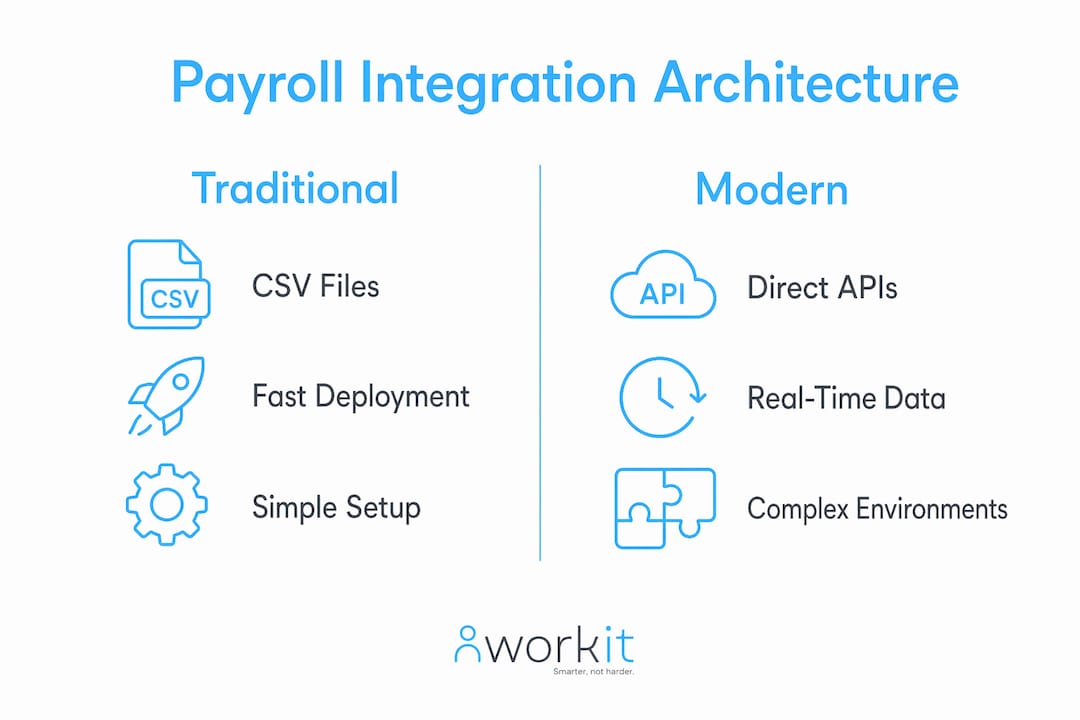
Enterprise payroll integration is a clearly governed data flow with defined ownership, timing, validation, and error handling across every connected system. That definition matters because most organisations treat integration as a technical task rather than a governance decision. The architecture you choose determines how fast you can deploy, how well the system handles complexity, and how much maintenance you carry long term.
Four main architectural approaches exist in enterprise environments:
| Architecture | Deployment speed | Best for | Key limitation |
|---|---|---|---|
| CSV file transfers | Fast initial setup | Simple, single-country payroll | Manual, error-prone, no real-time sync |
| Custom code | Varies widely | Bespoke enterprise needs | High maintenance burden |
| iPaaS platforms | Weeks to months | Mid-market, standard integrations | Limited payroll-specific logic |
| Unified APIs with context layers | Hours to days per country | Multi-country, complex payroll | Requires specialist configuration |
Modern enterprise payroll integration is shifting from CSV uploads to direct API connections that support 5–11 payslip and deduction fields for major payroll platforms. That shift reflects the reality that CSV transfers cannot validate data in real time or flag errors before a pay run processes. Specialised context layers, which translate HR data into payroll-ready formats for each jurisdiction, are the preferred approach for organisations operating across multiple Australian states or internationally.
Pro Tip: Before selecting an architecture, map every data field that crosses between your HRIS, payroll, and finance systems. Fields that travel across more than two systems need explicit ownership rules before you write a single line of integration code.
How does payroll integration protect data accuracy and compliance?
The most common cause of payroll errors in enterprise environments is unclear data ownership between HRIS and payroll systems. When the same field, such as an employee’s bank account or salary, can be edited in both systems, conflicts arise and payroll errors follow. The fix is defining a single system of record per data field and enforcing that rule technically, not just in policy documents.

Compliance requirements add another layer of precision. Australian payroll must correctly apply tax file number declarations, superannuation guarantee rates, and Fair Work Act entitlements. An integration that passes incorrect or stale data to your payroll engine can produce underpayments, which carry significant penalties under the Fair Work Act 2009.
Security is equally non-negotiable. 60% of payroll teams experienced a data breach in the prior 24 months. That figure means payroll data is a high-value target, and API credentials, encryption standards, and access controls must be vetted before any integration goes live.
Key governance controls every enterprise integration needs:
- A defined system of record for every payroll data field
- Automated validation rules that reject malformed or out-of-range data before processing
- Audit logs that record every data change, who made it, and when
- Encrypted API connections with credential rotation schedules
- Error alerting that notifies the payroll team before a pay run, not after
Pro Tip: Run a quarterly data reconciliation between your HRIS and payroll system. Discrepancies that surface in reconciliation are almost always symptoms of missing or broken ownership rules upstream.
What are the real benefits and challenges of payroll automation at scale?
The benefits of payroll integration are concrete and measurable. Removing manual data entry reduces transcription errors, cuts processing time, and frees your payroll team to focus on exception handling rather than data re-keying. Automated payroll-to-finance reporting means your general ledger reflects actual payroll costs without a manual journal entry after every pay run. 60% of organisations have already automated data entry in payroll, yet 41% still seek further automation in reporting. That gap shows where most enterprises are leaving efficiency gains on the table.
The challenges are equally real. Automating a broken process produces broken results faster. Auditing data flow across multiple systems requires dedicated effort, and vendor API changes can silently break integrations without warning.
Practical steps to prepare your payroll processes for integration:
- Conduct a manual touchpoint audit. List every point where a human currently moves payroll data between systems. This is your integration scope.
- Standardise data formats. Agree on field names, date formats, and code values across HR, payroll, and finance before building connections.
- Document business rules. Capture every calculation, rounding rule, and exception that your payroll team currently applies manually.
- Prioritise high-volume, low-complexity flows first. Automating new starter data from HRIS to payroll delivers fast value with manageable risk.
- Build error handling before go-live. Define what happens when a record fails validation. A silent failure is worse than a visible error.
Pro Tip: Treat your manual touchpoint audit as a process improvement exercise, not just an IT scoping exercise. You will find redundant steps that should be eliminated rather than automated.
How do enterprises maintain payroll integrations over the long term?
Payroll integration is an ongoing maintenance task, not a one-time project. Payroll vendors update their APIs regularly, and each update carries the risk of breaking existing connections. Enterprises that treat integration as “done” after go-live consistently experience silent failures that only surface during a pay run.
Effective long-term maintenance requires:
- Continuous API monitoring. Automated checks that confirm each integration endpoint is responding correctly, run at least daily.
- Validation pipelines. Automated rules that compare record counts and field values between systems after every sync, flagging discrepancies before they reach payroll processing.
- Dedicated ownership. A named person or team responsible for integration health. Shared responsibility across IT and payroll without a clear owner produces gaps.
- Vendor change management. A process for receiving, assessing, and implementing API change notices from payroll and HRIS vendors before deprecation deadlines.
- Incident response runbooks. Documented steps for restoring a failed integration quickly, including rollback procedures and manual workarounds for pay run continuity.
The HR reporting tools your team uses should connect directly to your payroll data pipeline so that compliance reports reflect live data rather than a snapshot from last month’s export.
What steps should HR and business leaders take to implement payroll integration?
Successful payroll integration projects start with alignment, not technology. HR, payroll, and finance leaders must agree on data ownership, process standards, and success metrics before any vendor is selected. Technology choices made before that alignment is reached almost always require expensive rework.
Before automating payroll processes, conduct a manual touchpoint audit to standardise data flows and avoid automating broken processes. This audit is the single most valuable preparation step an enterprise can take.
Practical guidance for HR and business leaders:
- Align stakeholders early. Bring HR, payroll, finance, and IT into the scoping process before vendor conversations begin.
- Define success metrics. Agree on what “working” looks like: error rates, processing time, reconciliation accuracy, and compliance report turnaround.
- Evaluate vendors on security and maintenance support. Ask specifically how the vendor handles API updates and what their incident response SLA covers.
- Plan for scale. A solution that works for 500 employees must handle 2,000 without architectural changes. Confirm scalability before signing.
- Allocate integration maintenance resources. Budget for ongoing monitoring, not just implementation. Integration projects that receive no post-launch resource consistently degrade within 12 months.
Understanding the difference between HR management and payroll software is a practical starting point for leaders who are mapping their current system landscape before selecting a payroll integration solution.
Pro Tip: Assign a single integration owner who sits across HR and IT. This person attends payroll vendor update briefings, owns the monitoring dashboard, and has authority to pause a pay run if integration health is compromised.
Key takeaways
Enterprise payroll integration succeeds when governance, architecture, and ongoing maintenance are treated as equally important as the initial technical connection.
| Point | Details |
|---|---|
| Governance before technology | Define data ownership and validation rules before selecting an architecture or vendor. |
| Architecture shapes outcomes | Unified APIs with context layers handle multi-jurisdictional complexity better than CSV transfers or custom code. |
| Security is non-negotiable | 60% of payroll teams experienced a data breach in 24 months; API security and encryption must be verified before go-live. |
| Audit before you automate | A manual touchpoint audit prevents broken processes from being replicated at speed inside an automated pipeline. |
| Integration requires ongoing maintenance | Payroll vendor API changes are frequent; dedicated monitoring and a named owner prevent silent failures. |
What I’ve learned after years of watching payroll integrations fail
The most common mistake I see is organisations treating payroll integration as a finished project. A team spends months scoping, building, and testing a connection between their HRIS and payroll engine, then declares it complete at go-live. Six months later, a vendor API update silently breaks the salary field sync, and the error surfaces in a pay run that underpays 200 employees.
The uncomfortable truth is that the technology is rarely the hard part. The hard part is governance. Who owns each data field? Who gets the alert when a sync fails at 11 PM on a Thursday before a Friday pay run? Who has the authority to delay payroll processing if data integrity is in question? These are not IT questions. They are HR and business leadership questions.
I also think the industry underestimates how much process standardisation matters before automation. Enterprises that skip the manual touchpoint audit and go straight to building API connections consistently end up automating their existing inconsistencies. The result is faster errors, not fewer errors.
The future direction I find genuinely promising is AI-assisted anomaly detection in payroll data pipelines. The ability to flag a salary figure that sits three standard deviations outside the norm for a given role, before the pay run processes, is a meaningful improvement over current validation approaches. But that capability only adds value on top of clean governance. It does not replace it.
Proactive maintenance is the mindset shift that separates enterprises with reliable payroll integration from those that lurch from incident to incident. Build the monitoring. Name the owner. Review the integration health monthly, not only when something breaks.
— Stephen
How Workit supports compliant payroll integration for Australian enterprises
Workit is built for Australian businesses that need HR, payroll, and compliance data to work together without manual re-entry or disconnected systems.
Workit’s all-in-one HRIS connects hiring, onboarding, leave, and compliance data in a single platform, giving your payroll team a clean, governed source of truth. Every module is included at $5 per employee per month, with no hidden fees and local Australian support. If you are ready to see how Workit handles payroll integration at enterprise scale, book a demo and speak with a team that understands the Australian compliance environment firsthand.
FAQ
What is enterprise payroll integration?
Enterprise payroll integration is the automated, governed connection between a payroll system and related platforms such as HRIS, finance, and time-tracking tools. It replaces manual data transfers with validated, real-time data flows that maintain accuracy and compliance at scale.
What are the main benefits of payroll integration?
The primary benefits of payroll integration include reduced manual data entry, fewer payroll errors, faster payroll-to-finance reporting, and stronger compliance with Australian Taxation Office and Fair Work Act requirements.
How do I choose the right payroll integration architecture?
The right architecture depends on your organisation’s complexity. Unified APIs with context layers suit multi-jurisdictional or multi-entity enterprises, while iPaaS platforms work well for standard, single-country payroll needs.
How often do payroll integrations need maintenance?
Payroll integrations require continuous monitoring and validation because payroll vendors update their APIs regularly. Treating integration as a one-time project leads to silent failures that surface during pay runs.
What is a system of record in payroll integration?
A system of record is the single authoritative source for a specific data field, such as salary or bank account details. Defining one system of record per field prevents conflicting edits between your HRIS and payroll system.