

Streamline executive HR reporting workflows in 2026
Automating executive HR reporting workflows is defined as replacing manual data collection and formatting with connected pipelines that deliver accurate workforce insights on a fixed schedule. HR managers currently spend 4–8 hours weekly pulling reports by hand. That time disappears entirely when automation handles data ingestion, validation, and distribution. The result is faster month-end reporting, fewer errors, and an HR function that advises the business rather than chasing spreadsheets. This guide covers the prerequisites, implementation steps, advanced analytics techniques, and common pitfalls for Australian HR professionals and executives ready to make that shift.
What does it take to streamline executive HR reporting workflows?
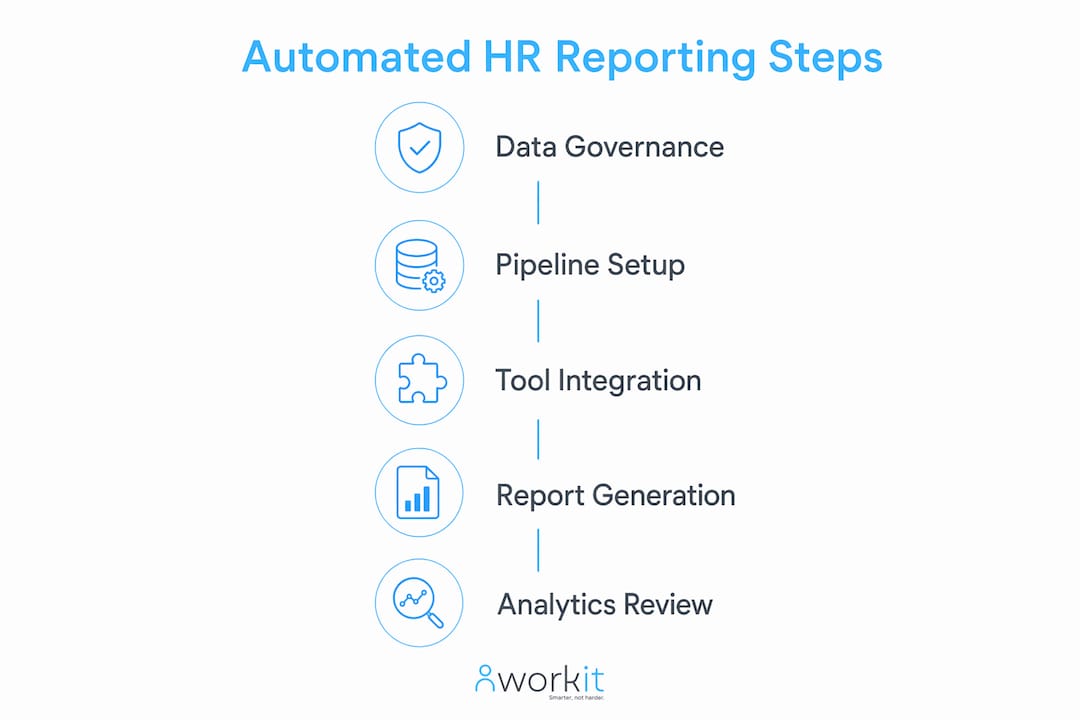
A unified data environment is the non-negotiable starting point. Your HRIS, payroll, recruiting, and performance systems must feed into a single source of truth before any automation can produce reliable results. Without that foundation, automated reports simply distribute errors faster than manual ones did.
Data governance comes before software selection. You need defined data owners, agreed field naming conventions, and documented refresh schedules for every data source. Automating without data hygiene leads to consistently incorrect reports. That is a harder problem to fix than a slow manual process, because executives lose trust in the numbers quickly.

Once governance is in place, the right tools make execution straightforward. The table below maps tool categories to the prerequisites each one requires.
| Tool category | Core prerequisite | Primary function |
|---|---|---|
| Integrated HRIS platform | Unified employee master data | Central data source for all HR metrics |
| Payroll integration layer | Matched employee IDs across systems | Accurate headcount and cost reporting |
| Analytics and dashboard platform | Clean, governed data feeds | Visualisation and scheduled report delivery |
| Automated distribution engine | Defined stakeholder list and cadence | Sends reports without HR intervention |
| Data quality monitoring tool | Documented refresh schedules | Flags stale data and failed pipeline runs |
Pro Tip: Audit your existing data before buying any new platform. A three-week data cleaning sprint before implementation will save months of troubleshooting after go-live.
How to implement automated HR reporting workflows step by step
Automation fails most often at the data ingestion stage, not the dashboard stage. Getting the pipeline right first means every report built on top of it is trustworthy. Routine report generation in professional services roles carries near-total automation potential, meaning almost zero manual effort once the pipeline is live.
Follow these steps to move from manual to automated executive reporting.
-
Map your current data sources. List every system that holds HR data: your HRIS, payroll platform, ATS, learning management system, and any spreadsheets. Identify the owner of each source and its refresh frequency.
-
Clean and standardise your data. Fix duplicate employee records, align field names across systems, and remove stale entries. The single biggest source of human error is manual data entry, so capturing data directly from your ATS to your HRIS via integration removes that risk at the source.
-
Build automated data pipelines. Connect your source systems using native integrations or an integration layer. Set validation rules that flag anomalies, such as headcount figures that shift by more than 10% overnight, before data reaches any report.
-
Standardise your executive report templates. Define the key HR metrics your leadership team needs: turnover rate, time to fill, absenteeism, and workforce cost as a percentage of revenue. Lock these into reusable templates so every report uses the same definitions.
-
Schedule recurring report runs. Set weekly, monthly, and quarterly reports to compile and distribute automatically. Automated reporting solutions can schedule compilation and distribution of key HR metrics with no HR intervention required.
-
Automate stakeholder distribution. Configure your platform to send finished reports directly to executives, board members, or finance partners on a fixed schedule. Remove the manual email step entirely.
-
Test and validate before go-live. Run parallel reports, one manual and one automated, for two pay cycles. Reconcile any differences before switching off the manual process.
Pro Tip: Build a simple exception report that runs before your main executive report. If the exception report is clean, the main report is safe to distribute. If it flags issues, you catch them before the CEO does.
How do advanced analytics platforms improve executive HR reporting?
Modern analytics platforms go well beyond scheduled dashboards. Advanced platforms now offer over 350 ready-to-use metrics covering workforce performance, risk, and cost. That depth means your HR team can answer board-level questions without building custom calculations from scratch.
Agentic AI and natural language querying represent the most significant shift in HR reporting capability right now. Natural language querying allows HR analysts to generate complex executive reports in seconds without needing a BI specialist. An HR business partner can type “show me turnover by department for the last two quarters” and receive a formatted report immediately.
The practical benefits of adopting an advanced analytics platform include:
- Predictive workforce insights. Platforms with machine learning can flag flight risk, forecast headcount needs, and model the cost of different retention scenarios before executives ask.
- Customisable executive dashboards. Drag-and-drop dashboard builders let you tailor views for the CFO, CEO, and board without duplicating underlying data.
- On-demand ad hoc reporting. Agentic AI removes the need for BI specialists, enabling HR staff to generate executive reports using natural language chat whenever a question arises.
- Consistent metric definitions. Centralised metric libraries mean every report uses the same formula for turnover, engagement, or absenteeism, regardless of who runs it.
- Faster board pack preparation. Automated data refresh means your board pack pulls live data on the morning it is due, not the figures from last week.
Pro Tip: Start with five to eight metrics your executive team already asks about regularly. Build those into your first automated dashboard before adding predictive features. Executives trust a simple, accurate report far more than a complex one they cannot interpret.
What are the most common pitfalls when automating executive HR reporting?
The most damaging mistake is automating a broken process. [Automating fragmented HR reporting pipelines](https://www.kpipartners.com/case-studies/case-study-breaking free-from-workdays-reporting-limitations) can cut month-end processing time by 60% and reduce operational overhead by more than 50%, but only when the underlying data is clean. Automate bad data and you produce wrong answers at scale, faster than before.
Report sprawl is the second major risk. Self-service analytics tools make it easy for teams to create dashboards, but without governance, organisations accumulate hundreds of reports that nobody maintains. Unmanaged self-service analytics causes performance degradation and user confusion. Quarterly audits to remove redundant dashboards are the recommended fix.
Common pitfalls to watch for include:
- Prioritising dashboards over data pipelines. A polished dashboard built on an unstable data feed will break regularly and erode executive confidence.
- Skipping access controls. Sensitive workforce data needs role-based access. Distributing an unfiltered executive report to the wrong audience is a compliance risk under Australian privacy law.
- Ignoring pipeline monitoring. A governed HR reporting framework must include monitoring for data refresh failures, stale data, and access violations to prevent broken reports reaching executives.
- No deprecation policy. Old reports left running consume system resources and confuse users. Assign an owner to every report and review the list quarterly.
- Over-engineering the first release. A two-page executive summary with six reliable metrics beats a 20-page report that takes three weeks to reconcile.
Pro Tip: Assign a named data steward to each HR data source. When a pipeline fails or a metric looks wrong, you need one person who can diagnose the issue in under an hour, not a committee.
Key takeaways
Automating executive HR reporting requires clean data governance first, then pipeline automation, then analytics, in that order.
| Point | Details |
|---|---|
| Governance before automation | Clean and govern your data before building any automated pipeline or dashboard. |
| Unified data environment | Connect HRIS, payroll, and recruiting into one source of truth to produce reliable reports. |
| Scheduled report distribution | Automate compilation and delivery so executives receive accurate reports without HR intervention. |
| Advanced analytics capability | Platforms with 350+ metrics and natural language querying remove the need for BI specialists. |
| Ongoing audit discipline | Run quarterly report audits to remove redundant dashboards and maintain pipeline health. |
What I have learned from building HR reporting systems at scale
The organisations that get the most value from automated HR reporting are not the ones with the most sophisticated dashboards. They are the ones that spent the most time on their data architecture before touching a single visualisation tool.
I have seen well-funded HR teams buy enterprise analytics platforms and spend the first six months firefighting data quality issues that should have been resolved before go-live. The phased approach, data spine first, governance layer second, dashboards third, is not a conservative choice. It is the only approach that produces a reporting environment executives actually trust.
The other thing worth saying plainly: automation does not replace HR judgement. It replaces the administrative work that was preventing HR professionals from exercising that judgement. When your month-end report runs itself, you have four to eight hours back every week to spend on workforce planning, retention conversations, and advising the leadership team. That is the real return on investment.
Sustaining that return requires ongoing review. Every six months, ask your executive stakeholders which reports they actually read and which ones they ignore. Deprecate the ignored ones. Add what is missing. A reporting environment that reflects real business questions is worth far more than one that reflects what HR thought executives needed two years ago.
— Stephen
Workit and automated executive HR reporting for Australian businesses
Australian HR teams running disconnected systems spend more time reconciling data than reporting on it. Workit brings your HR data together in one place, with built-in reporting tools that schedule and distribute executive reports automatically.
Workit suits organisations across finance, not-for-profits, and small business, with all modules included at $5 per employee per month and no hidden fees. Local Australian support means you get practical help from people who understand Fair Work obligations and Australian compliance requirements. If you are ready to move your HR team from manual reporting to real-time workforce intelligence, book a demo and see how Workit works for your organisation.
FAQ
What does it mean to automate executive HR reporting?
Automating executive HR reporting means replacing manual data collection and formatting with connected pipelines that compile, validate, and distribute workforce metrics on a fixed schedule without HR intervention.
How long does it take to implement automated HR reporting?
Implementation timelines vary by data complexity, but most organisations complete the data governance and pipeline setup phase within six to twelve weeks before launching their first automated executive reports.
What HR metrics should executive reports include?
Executive HR reports typically cover turnover rate, time to fill, absenteeism, workforce cost as a percentage of revenue, and headcount by department. Workit’s HR metrics guide outlines the full list relevant to Australian businesses.
What is the biggest risk when automating HR reporting workflows?
The biggest risk is automating before your data is clean. Automated pipelines built on poor data produce incorrect reports at scale, which erodes executive trust faster than any manual process would.
How do I prevent report sprawl in a self-service analytics environment?
Run a quarterly audit of all active reports and dashboards, assign a named owner to each one, and apply a deprecation policy that removes any report that has not been accessed in 90 days.