

HR payroll integration in Australia: what to check first
If your payroll software can handle Single Touch Payroll Phase 2, integrating it with your HR system is the right move. The business case is straightforward: fewer manual errors, faster onboarding, and a real-time compliance trail the Australian Taxation Office expects. But STP Phase 2 and payday super are the two constraints that decide whether integration goes smoothly or turns into a lengthy and complex challenge.
Before you sign anything, do this:
- Run a short requirements workshop with HR, payroll and finance.
- Confirm STP Phase 2 connectivity with your payroll vendor or digital service provider.
- Check payday super readiness against your current super fund reporting cycle.
Key Takeaways
Successful HR payroll integration in Australia depends on verified STP Phase 2 support, clean data migration, and a realistic budget for change management, not just software fees.
| Point | Details |
|---|---|
| Verify STP Phase 2 first | Confirm disaggregated income types, BMS ID handling and payroll ID transfer with your vendor before signing anything. |
| Budget beyond the licence fee | Change management, training and data cleanup regularly cost more than the subscription itself. |
| Test before you cut over | Run parallel pay cycles and sandbox STP submissions to catch mapping errors before go-live. |
| Match the model to your size | Native platforms suit small and mid-sized teams; custom API integration suits enterprises with in-house IT. |
| Workit offers an integrated path | All-in-one HR with payroll integration and real-time compliance tracking at $5 per employee per month. |
Table of Contents
- How HR–payroll integration works in Australia
- Key benefits of connecting HR and payroll
- Compliance checklist before you integrate payroll systems
- Which integration approach fits your business
- Implementation steps, testing and realistic timelines
- What HR payroll integration actually costs
- How Workit supports payroll integration and compliance
- Priorities that actually move the needle
- Get your STP readiness checked before you commit
- Where to check the rules yourself
- Sources
- FAQ
How HR–payroll integration works in Australia
Three models dominate the market. Native integration means your HR and payroll functions sit inside one platform, sharing a single database. Middleware connects two separate systems (say, a standalone HRIS and Xero) via a third-party connector. Custom API integration means your developers build and maintain the connection themselves.
Whichever model you choose, the data has to move correctly. Australian payroll integrations need to pass specific fields without dropping or mismatching them:
- Tax File Number (TFN) and employee payroll ID
- Business Management Software (BMS) ID, which identifies the software product to the ATO
- Disaggregated income types (salary and wages, working holiday maker income, etc.)
- Country codes for overseas workers
- Superannuation fund details and child support deduction fields
These requirements come directly from STP Phase 2 employer reporting guidelines, which mandate disaggregated reporting rather than the lump-sum figures STP Phase 1 allowed.
On the connection side, software reaches the ATO through a software ID, a sending service provider, or a machine credential, and the ATO’s STP checklist sets out which method suits which setup. Real-time syncing pushes data the moment a pay run finalises; scheduled syncing batches it overnight. For most small and mid-sized employers, scheduled syncing is fine. Larger, multi-entity operations usually need real-time connections to avoid reconciliation lag.
Key benefits of connecting HR and payroll
Once HR and payroll talk to each other properly, the payoff shows up fast, not in vague “efficiency gains” but in specific operational wins:
- Award and penalty rate calculations pull from a single, current record instead of two systems that drift apart over time.
- New starters get paid correctly and reported to the ATO from their very first pay run, with no manual re-entry of TFN or super details.
- Audits become far less painful because pay history, leave balances and employment records live in one traceable place.
- HR teams get workforce analytics (turnover, leave liability, overtime trends) without exporting spreadsheets from two systems and reconciling them by hand.
Pro Tip: Run a “shadow payroll” test for one pay cycle before full cutover. Process pay manually alongside the new integrated system and compare the outputs line by line. It catches mapping errors that testing environments often miss.
Compliance checklist before you integrate payroll systems
Getting HR and payroll systems talking is the easy part. Getting them talking correctly, in a way that survives an ATO audit or a Fair Work investigation, is where most projects stumble. Work through this in order:
- Confirm full STP Phase 2 support. Your provider must handle disaggregated income types, correct BMS ID transmission, and payroll ID continuity when you switch software. The ATO’s transition guidance sets out exactly how payroll IDs and year-to-date amounts need to transfer.
- Check superannuation calculations, including payday super. Super guarantee obligations are shifting toward payment alongside wages rather than quarterly, so your integration needs to calculate and report super at the same cadence as pay runs, not as an afterthought.
- Verify award interpretation logic. A system that can’t correctly apply penalty rates, allowances, and classification changes from the Fair Work awards framework creates underpayment risk regardless of how well it handles STP.
- Audit data privacy and storage. Employee TFNs, bank details, and medical information handled by integrated systems must meet the Australian Privacy Principles, and you should confirm exactly where your vendor stores and encrypts that data.
- Plan the STP transition mechanics. Zeroing out year-to-date amounts, transferring payroll IDs correctly, and hitting finalisation deadlines (employers generally need STP finalisation declarations lodged by 14 July) all need to be mapped before go-live, not discovered during it.
STP Phase 2 exists partly to cut duplicate reporting to government agencies by capturing more detail upfront, according to the ATO’s own explanation of the Phase 2 expansion. That trade-off, more upfront data accuracy in exchange for less duplicate reporting later, is exactly why the checklist above front-loads verification work rather than leaving it for post-launch cleanup.
Which integration approach fits your business
The right model depends less on preference and more on your workforce size, your existing tech stack, and how much internal IT capacity you actually have.
- Native all-in-one platforms suit small and mid-sized businesses without dedicated IT staff. Maintenance is lower because one vendor owns the whole data flow, and STP setup tends to be simpler because there’s no handoff between systems.
- Best-of-breed plus middleware gives you specialist tools (a dedicated rostering app, a niche performance platform) connected by a third-party layer. It’s flexible, but every connector is another thing that can break, and change management costs climb accordingly.
- Custom API integration makes sense for large enterprises with in-house developers who can build, test, and maintain bespoke connections. It demands rigorous field mapping and ongoing support, but it scales to complex multi-entity structures that off-the-shelf connectors can’t handle.
Weigh workforce size against IT capacity first. A 40-person retail business gains little from a custom API build, while a 2,000-person enterprise with five awards in play will likely outgrow a basic native connector. Accounting platform compatibility and how complex your award coverage is matter just as much as headcount. For a structured way to weigh these factors, Workit’s guide to choosing payroll software that integrates with your HRIS walks through the selection criteria in more depth.
Implementation steps, testing and realistic timelines
Rushing this stage is where most integration projects lose weeks later on rework. A disciplined sequence looks like this:
- Requirements workshop. Get HR, payroll, finance and IT in one room (or one call) to document every must-have field: STP data points, award rules, super fund details, and any custom pay conditions.
- Data mapping and migration. Prioritise employee records, payroll history, and leave balances. This is also when you’ll find the data quality issues nobody wants to deal with: duplicate employee IDs, outdated TFN declarations, mismatched super fund details.
- Integration testing. Run sandbox STP submissions, process sample pay runs, and specifically check that BMS IDs and payroll IDs transfer without corruption. Reconcile every test run against your old system’s output.
- Phased go-live. Run parallel pay runs (old and new systems side by side) for at least one full cycle before cutting over completely. Set clear sign-off checkpoints and don’t skip them under deadline pressure.
- Post-go-live monitoring. Budget time in the following pay cycles specifically to catch issues the parallel run didn’t surface.
Timelines vary by scale. Smaller businesses may complete integration in a shorter timeframe, while larger enterprises with complex requirements can expect longer timelines, potentially several months, depending on their circumstances.
Pro Tip: Never go live on a payday. Cut over mid-cycle, ideally right after a pay run finalises, so you have a clean checkpoint to roll back to if something goes wrong.
Workit’s practical implementation guide for Australian businesses includes testing templates you can adapt to your own timeline.
What HR payroll integration actually costs
Subscription fees are the visible part of the bill. The real budget blowouts happen elsewhere: implementation services, data migration cleanup, internal project hours (often underestimated by half), staff training, middleware connector fees, and ongoing API maintenance if you’ve gone custom.
- Complex award interpretation adds testing time you didn’t plan for.
- Multiple payroll IDs across merged entities or acquisitions multiply mapping work.
- Bespoke field mapping between legacy systems routinely extends testing cycles by weeks, not days.
Change management, training and ongoing upkeep regularly cost more than the software licence itself, and it’s rarely the tool that’s feature-poor, it’s the fit with your existing tech ecosystem that determines whether costs stay controlled. Set a contingency budget, name one person as the integration owner, and schedule structured monitoring for at least the first two pay cycles post go-live.
How Workit supports payroll integration and compliance
Workit gives Australian businesses one platform for HR, with payroll integration (including Xero) built in rather than bolted on. Real-time compliance tracking means STP Phase 2 fields, award classifications and super details stay current without a separate reconciliation step, and pricing sits at a flat $5 per employee per month across every module, with no hidden add-on fees.
Before you commit to any integration path, check for:
- Local support that understands STP Phase 2 and Fair Work award mechanics, not an overseas call centre reading from a script.
- Transparent, predictable pricing that doesn’t scale unpredictably as you add modules.
- A clear path from onboarding through to compliance reporting, without exporting to spreadsheets at any stage.
Priorities that actually move the needle
Most integration failures I’ve seen trace back to skipping step one: the requirements workshop. Teams jump straight to vendor selection because it feels like progress, then discover six weeks in that nobody agreed on how leave balances should map across systems.
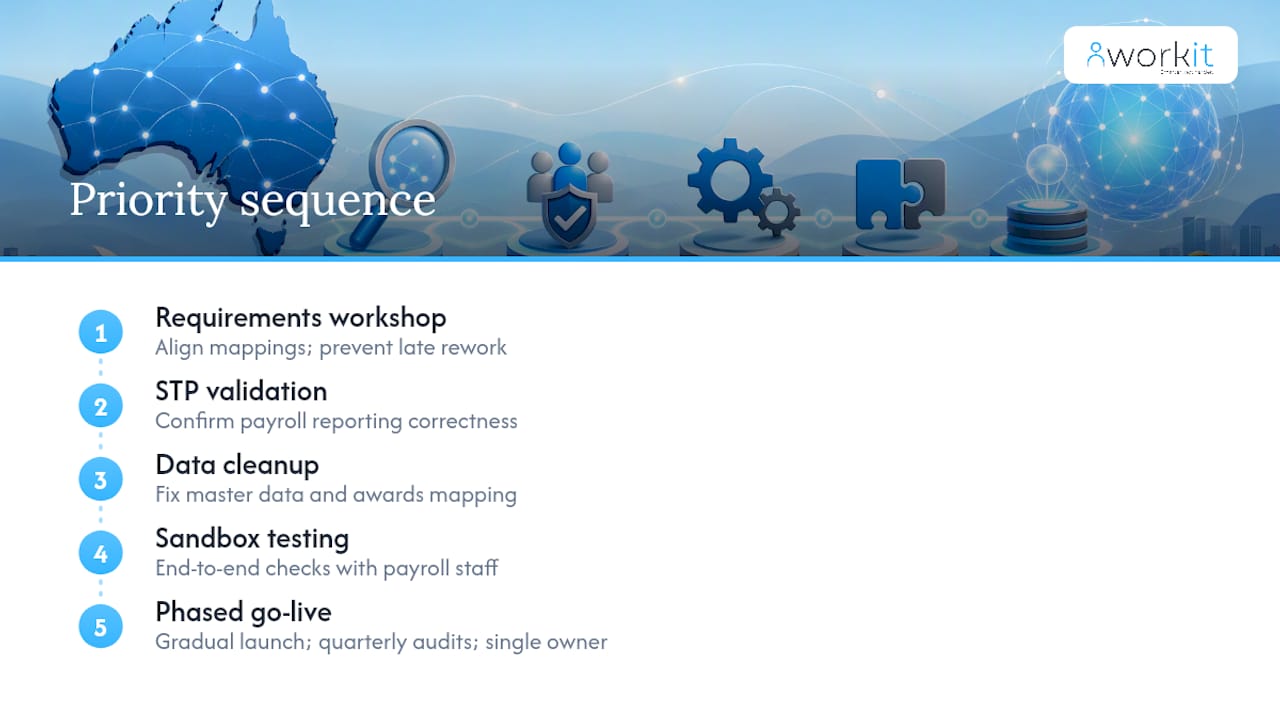
My priority sequence is fixed: requirements workshop, then STP validation, then data cleanup, then sandbox testing, then a phased go-live. Skip the order and you’ll pay for it later in rework.
The biggest underestimation isn’t technical. It’s change management and award complexity. A system can be perfectly configured and still fail if payroll staff don’t trust the new outputs or nobody’s mapped which awards apply to which cost centre.
Two things keep integrations healthy after launch: schedule a quarterly data audit rather than waiting for something to break, and name one person, not a committee, as the ongoing integration owner. Committees are where accountability for a broken sync quietly disappears.
Get your STP readiness checked before you commit
Workit is built specifically for the compliance requirements covered above, STP Phase 2, payday super, award interpretation, without asking you to stitch together separate systems or pay per module. Where a middleware setup means juggling vendor support tickets across two companies, Workit gives you one local support team that already knows how Australian payroll rules work.
Every module, from onboarding through to compliance reporting, sits inside the one $5-per-employee-per-month platform. There’s no separate fee for the payroll connection, no surprise charge when you add a compliance module six months in. If you want to see exactly how Workit handles STP Phase 2 fields and award data before you decide anything, book a walkthrough on the Workit demo page or read the buyer guide to choosing HR software in Australia for a side-by-side look at what to check. A short technical call is enough to confirm whether your current payroll setup is STP-ready for integration.
Where to check the rules yourself
- Use the ATO’s STP Phase 2 employer reporting guidelines for exact reporting field requirements.
- Check Fair Work’s awards guidance when your integration needs to handle penalty rates or classification changes.
- Refer to the OAIC’s Australian Privacy Principles before signing off on any vendor’s data storage practices.
- Workit’s HR compliance software checklist and the partner article on AI-driven HR compliance best practices both go deeper on ongoing audit readiness.
Sources
- Single Touch Payroll Phase 2 employer reporting guidelines | Australian Taxation Office
- Transitioning from STP Phase 1 to STP Phase 2 reporting | Australian Taxation Office
- Awards | Fair Work
- Australian Privacy Principles | OAIC
FAQ
Does HR have anything to do with payroll?
Yes. HR owns the source data (employment terms, classifications, leave, super details) that payroll relies on to run correct, compliant pay runs, which is exactly why disconnected systems create errors.
How does payroll integration work?
HR and payroll systems exchange data through native connections, middleware, or custom APIs, syncing fields like TFN, payroll ID, income type and super details either in real time or on a scheduled batch.
What is the most popular payroll software in Australia?
Xero is widely used among Australian small and mid-sized businesses, and Workit integrates directly with it as part of its all-in-one HR platform.
What are the top HRIS systems in Australia?
The right HRIS depends on workforce size, award complexity and IT capacity; all-in-one platforms like Workit suit businesses wanting payroll integration, compliance tracking and onboarding in a single system without per-module fees.
How do I know if my payroll software is STP Phase 2 ready?
Check the ATO’s STP checklists and ask your provider directly whether they support disaggregated income types, BMS ID transfer and payroll ID continuity.