

Onboarding portal features every Australian HR team needs
The three features every onboarding portal must have are automated new-hire workflows, secure document collection with auditable e-signatures, and integrations to payroll and HRIS systems. For Australian employers, you also need TFN and superannuation capture, Fair Work Information Statement distribution with acknowledgement tracking, and role-based access controls that satisfy the Australian Privacy Principles. Together, these six capabilities cover the compliance, efficiency, and visibility requirements that matter most when you are onboarding staff at any scale.
For an Australian business, the stakes are higher than a generic checklist suggests. The Fair Work Act and the Privacy Act 1988 create specific obligations around document distribution, data handling, and retention. A portal that cannot demonstrate auditable acceptance of the Fair Work Information Statement, or that stores TFN data without encryption and access controls, exposes you to real regulatory risk.
Before you brief a supplier, confirm your portal can do all of the following:
- Automate pre-boarding, day-one, and 30/60/90-day task sequences
- Collect TFN declarations and superannuation choice forms digitally, with secure storage
- Distribute the Fair Work Information Statement and record signed acknowledgement
- Integrate directly with your payroll system (Xero or equivalent) to eliminate rekeying
- Enforce role-based permissions so payroll data is visible only to authorised staff
- Produce audit-ready reports on task completion, policy acknowledgements, and document access
Organisations that launch a well-designed onboarding portal typically reach 20–30% self-service adoption within 90 days, rising to 40–50% over 12 months when knowledge base content and Teams or Slack integration are in place.
Key takeaways
The highest-priority onboarding portal features for Australian employers are automated workflows, TFN and super capture, Fair Work Information Statement distribution with auditable acknowledgement, payroll integration, role-based access, and mobile-accessible training tracking.
| Point | Details |
|---|---|
| Compliance features are non-negotiable | TFN capture, super choice forms, and Fair Work distribution must be auditable and digitally stored. |
| Integration prevents rekeying errors | Direct payroll and HRIS integration eliminates manual data entry and reduces payroll processing errors. |
| Adoption targets are measurable | Well-launched portals reach 20–30% self-service adoption within 90 days and 40–50% over 12 months. |
| Local support matters | A vendor with Australian-based support and knowledge of local employment law reduces implementation risk. |
| Workit covers the full checklist | Workit’s onboarding module includes TFN/super capture, Xero integration, LMS, policy tracking, and local support at $5 per employee per month. |
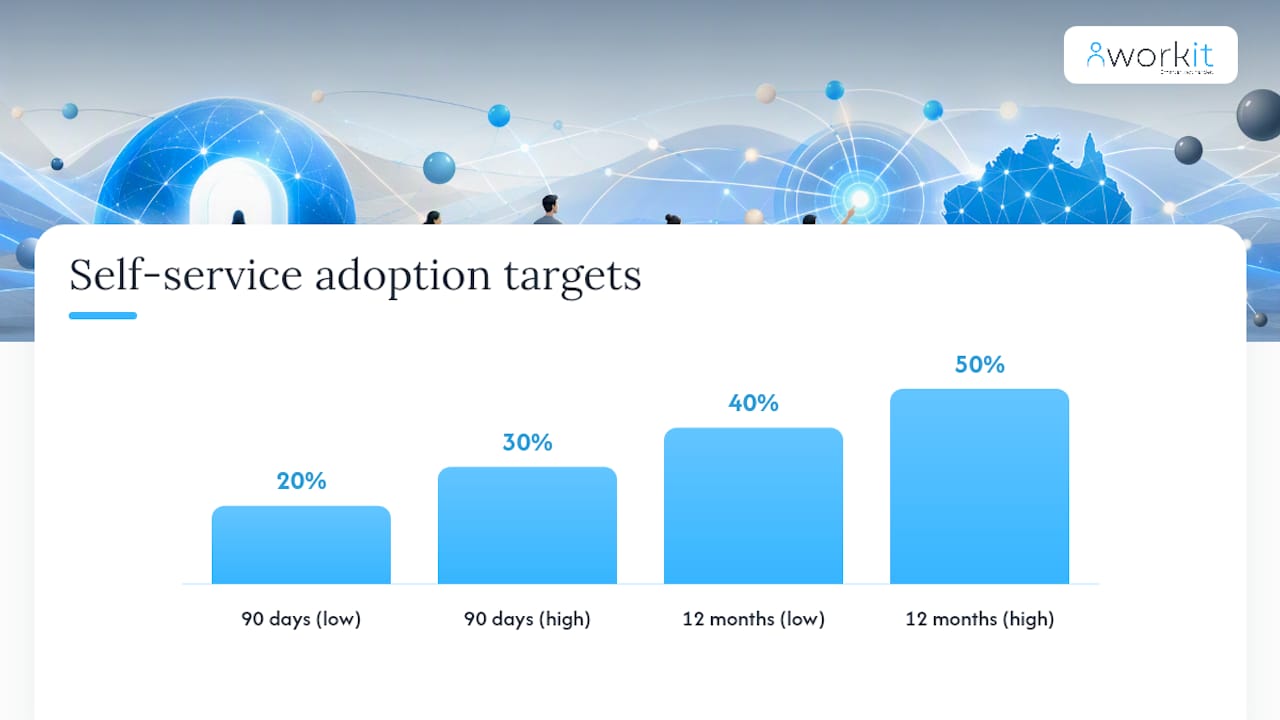
Table of Contents
- What onboarding portal features should you actually specify?
- What security and compliance controls does an Australian portal need?
- How do integrations and automation cut manual work?
- What admin controls and workflow configuration do HR and IT need?
- How do you launch a portal and reach measurable adoption?
- What does implementation typically cost and how long does it take?
- What do Australian HR teams need to know from local research?
- How does your portal connect to Australian tax and benefit systems?
- What privacy and security controls go beyond the Australian Privacy Principles?
- Workit covers the full feature checklist for Australian employers
- Sources
- FAQ
What onboarding portal features should you actually specify?
The term “onboarding portal” covers a wide range of software capabilities, from a simple document upload folder to a fully automated new-hire engagement platform. The features that deliver real operational value fall into six practical groups.
Automated new-hire checklists and task management
A good portal assigns tasks automatically based on role, location, employment type, and start date. Pre-boarding tasks (tax forms, equipment requests, welcome messages) fire before day one. Day-one tasks cover system access, induction sessions, and policy sign-offs. The 30/60/90-day sequence handles probation check-ins, role-specific training, and manager reviews.
For a casual hire in retail, the sequence might be: TFN form on day minus three, Fair Work Information Statement on day minus two, uniform order on day minus one, and a short induction video on day one. For a remote software engineer, the same engine routes equipment shipping, VPN access provisioning, and a team introduction flow through a different path. The workflow engine handles both without HR manually reassigning tasks.
Well-designed onboarding platforms reduce manual rework and speed time-to-productivity by combining automated workflows with digital document capture and role-based training paths.
Secure document collection, e-signatures, and storage
Every document collected during onboarding needs a tamper-evident audit trail: who signed, when, from which device, and whether the document version was current at the time of signing. This applies to employment contracts, TFN declarations, superannuation choice forms, and policy acknowledgements.
Storage must meet Australian Privacy Principles (APPs) requirements: encrypted at rest, access-controlled, and retained for the legally required period. A portal that emails PDFs back and forth and stores them in a shared drive does not meet this standard.
Learning management and training tracking
Role-based learning paths let you assign mandatory induction modules, compliance training, and role-specific content automatically. Managers see completion status in real time, which removes the need for follow-up emails. Certificates generate automatically on completion, creating a record for audits or licensing requirements.
Pro Tip: Build your top five compliance modules (WHS induction, code of conduct, privacy awareness, anti-discrimination, and emergency procedures) into every new-hire learning path as defaults, then layer role-specific content on top. This ensures no hire misses mandatory training regardless of which manager runs the process.
Policy distribution and acknowledgement tracking
Distributing a policy is not the same as proving an employee read and accepted it. A portal records the exact version distributed, the date and time of acknowledgement, and the employee’s digital signature. When Fair Work Australia or a regulator asks for evidence, you produce a report rather than searching through email threads.
Employee self-service, directory, and in-portal communications
Self-service features let new hires update their own contact details, bank accounts, and emergency contacts without raising an HR ticket. A company directory with org chart integration helps new starters understand the team structure before they arrive. Welcome messages and team introduction flows, triggered automatically on the start date, reduce the social anxiety of day one.
Mobile-first design and accessibility
A portal that only works on a desktop excludes frontline workers, casual staff, and anyone onboarding remotely. Mobile-first design means the full onboarding sequence, including document signing, training modules, and task completion, works on a phone without degraded functionality. Multi-language support and compliance with the Web Content Accessibility Guidelines (WCAG) 2.1 AA standard, which aligns with Australia’s Disability Discrimination Act 1992, ensures your portal is usable by a diverse workforce.
What security and compliance controls does an Australian portal need?
Australian employers face specific legal obligations that go beyond generic data security. Your portal must address all of the following.
Australian compliance requirements
- TFN declarations and super choice forms: Collect digitally, store encrypted, restrict access to payroll staff only, and retain for the period required by the Australian Taxation Office.
- Fair Work Information Statement: Distribute to every new employee before or on day one, record the date of distribution, and capture a signed acknowledgement. The Fair Work Act 2009 requires this for all national system employees.
- Data residency: Confirm that employee data is stored on servers located in Australia or in a jurisdiction that meets APP 8 cross-border disclosure requirements.
- Retention and purge policies: Define how long each document type is retained and automate deletion at the end of the retention period to avoid holding personal data longer than necessary.
Australian onboarding checklists consistently identify TFN and super collection, Fair Work Information Statement distribution, policy acknowledgement tracking, and employee self-service as the core automation items for local compliance.
Technical security controls
- Encryption in transit (TLS 1.2 or higher) and at rest (AES-256 or equivalent)
- Role-based access control (RBAC) with least-privilege defaults
- Single sign-on (SSO) via SAML 2.0 or OAuth 2.0 to reduce credential sprawl
- Multi-factor authentication (MFA) for all admin and HR accounts
- Immutable audit logs recording every document access, edit, and deletion
- Automated backups with tested restore procedures
Vendor compliance checklist
When assessing vendors, ask these questions directly:
- Where are employee data and documents physically stored?
- What encryption standards apply to data at rest and in transit?
- How are TFN data and tax documents isolated from general HR records?
- What is the retention and deletion policy for each document type?
- Can the system produce an audit report showing who accessed a specific document and when?
- Is the platform certified to ISO 27001 or SOC 2 Type II?
Pro Tip: Ask vendors for a sample audit report before you sign a contract. A vendor who cannot produce a clear, readable audit trail in a demo environment is unlikely to produce one when you need it for a Fair Work inspection.
How do integrations and automation cut manual work?
Without integration, HR teams re-enter data from the onboarding portal into payroll, IT ticketing, and directory systems. That rekeying introduces errors and delays. The right integration architecture turns onboarding from a checklist into an operational workflow.
Core integration points
- Payroll (Xero and equivalents): When onboarding completes, employee records, bank details, super fund, and TFN transfer automatically to payroll. No manual export, no rekeying.
- HRIS and directory sync: New hire data populates the employee directory, org chart, and access groups without a separate data entry step.
- SSO and SCIM provisioning: The portal triggers account creation in Microsoft 365, Google Workspace, or other identity providers the moment an employee record is activated.
- IT service management (ITSM): Equipment requests and software licence assignments route automatically to IT as structured tickets, with due dates tied to the start date.
A practical automation sequence
- HR creates the employee record and sets the start date.
- The portal sends a pre-boarding invitation with a secure link to complete TFN, super, and bank details.
- On completion, payroll data syncs to Xero automatically.
- An IT provisioning ticket is raised with the required software list and equipment type.
- The manager receives a notification to approve system access.
- On day one, the employee’s accounts are active and their induction checklist is waiting in the portal.
Integration test cases to run before go-live
- Create a test employee record and confirm the payroll sync transfers all required fields correctly.
- Trigger SSO login from a new device and verify MFA is enforced.
- Submit a test equipment request and confirm the ITSM ticket is created with the correct assignee and due date.
- Complete a test policy acknowledgement and verify the audit log records the correct timestamp and document version.
No-code portal templates can speed prototyping of onboarding journeys, but you must validate security, integrations, and data residency before moving any prototype to production.
What admin controls and workflow configuration do HR and IT need?
A portal your HR team cannot configure without a developer is a portal that will fall behind your business. The admin layer matters as much as the employee-facing features.
Workflow engines and conditional logic
A workflow engine lets you build branching sequences: if the hire is casual, skip the probation review task; if the location is Queensland, add the state-specific WHS induction; if the manager has not approved access by day minus two, escalate to the HR manager. These rules run automatically without anyone monitoring a spreadsheet.
Role-based permissions and segregation of duties
| Role | Typical access |
|---|---|
| HR administrator | Full read/write access to all employee records, forms, and reports |
| Hiring manager | View and complete tasks for their direct reports only |
| Payroll officer | Read access to TFN, super, and bank details; no access to performance or training data |
| IT administrator | View equipment and access provisioning tasks; no access to personal HR data |
| New hire | Complete their own tasks and view their own documents only |
Segregation of duties prevents a single user from both creating an employee record and approving their own payroll data, which is a basic internal control requirement.
Admin dashboard capabilities
Your admin dashboard should show, at a glance: tasks overdue by more than 24 hours, incomplete forms blocking payroll processing, policy acknowledgements outstanding, and training completions by department. HR reporting features that surface these metrics in real time let you intervene before a compliance gap becomes a problem.
Change control for onboarding templates is often overlooked. When you update a policy or a form, the portal should version the template, retain the previous version for audit purposes, and apply the new version only to hires who start after the change date.
How do you launch a portal and reach measurable adoption?
A portal nobody uses is a compliance liability, not an asset. Adoption requires deliberate planning, not just a go-live announcement.
Implementation checklist
- Map stakeholders: HR, IT, payroll, legal, and at least two hiring managers
- Select a pilot group of 10–20 new hires across two or three role types
- Author knowledge base articles for the top 15–20 contact reasons before launch
- Test portal search with real employee language (not HR jargon)
- Build a communications plan: manager briefing, new-hire welcome email, and IT redirect notices
- Train hiring managers on their portal tasks before the pilot starts
KPI targets and adoption benchmarks
At 90 days, target 20–30% self-service adoption for the broader employee base, with a 12-month target of 40–50% when knowledge base content and Teams or Slack integration are active.
Track HR metrics including time-to-productivity, onboarding task completion rates, and manager satisfaction scores alongside the self-service adoption rate.
Numbered rollout sequence
- Stakeholder alignment and requirements sign-off (weeks 1–2)
- Portal configuration, branding, and workflow build (weeks 3–5)
- Integration testing with payroll and IT systems (week 6)
- Pilot with 10–20 new hires and structured feedback collection (weeks 7–9)
- Refinement based on pilot findings (week 10)
- Full launch with communications campaign and manager training (week 11)
- 30-day adoption review and knowledge base gap analysis (week 15)
Pro Tip: Embed the portal link in every IT touchpoint: email auto-replies, intranet banners, Teams or Slack bot messages, and email signatures. Train your HR team to redirect phone queries back to the portal. These three actions, combined with pre-authored knowledge articles, are the highest-impact levers for lifting adoption quickly.
What does implementation typically cost and how long does it take?
Timelines and costs vary by organisation size and configuration complexity. The table below reflects typical ranges for Australian SMEs.
| Organisation size | Implementation timeline | Typical phases |
|---|---|---|
| Small (under 50 employees) | 4–6 weeks | Configuration, integration, pilot, launch |
| Mid-market (50+) employees | 6–10 weeks | As above plus custom workflows and manager training |
| Larger SME (250+) employees | 10 weeks | As above plus HRIS migration, SSO setup, and staged rollout |
Cost pointers
- Per-employee licence: Transparent SaaS pricing (such as Workit’s $5 per employee per month model) makes budgeting straightforward. All modules are included with no hidden fees.
- Implementation services: Optional paid implementation support covers configuration, data migration, and training. Budget for this separately from the licence cost, particularly for mid-market and larger SME rollouts.
- Customisation scope: Custom branding, bespoke workflow logic, and non-standard integrations add time and cost. Scope these explicitly in your RFP.
Template types to prepare before briefing suppliers
- RFP brief with feature checklist (use the procurement brief items from the opening section)
- Pilot test plan with acceptance criteria for each integration point
- Communications checklist for manager briefing, new-hire welcome, and IT redirect notices
- Day-one welcome pack brief for physical merchandise and branded materials
For a detailed procurement framework, Workit’s HR software buyer guide covers feature prioritisation and cost considerations specific to Australian HR teams.
What do Australian HR teams need to know from local research?
Australian implementations have specific characteristics that generic global guides miss.
Compliance priorities local teams consistently flag
- TFN declarations must be collected before the first pay run. A portal that cannot capture this digitally forces a paper fallback, which creates a storage and access-control problem.
- The Fair Work Information Statement must be distributed to every new employee. Digital distribution with a timestamped acknowledgement is accepted as evidence of compliance, and it is far easier to produce in an audit than a paper record.
- Super choice forms require the employee to actively select a fund or confirm their existing fund. The portal must support both scenarios and store the completed form securely.
Australian onboarding compliance guidance consistently identifies these three items as the highest-risk gaps in manual onboarding processes.
Local adoption benchmarks
ANZ ITSM practice shows that well-launched portals reach 20–30% self-service adoption within 90 days. The organisations that reach the higher end of that range share three characteristics: they pre-author knowledge articles before launch, they embed the portal link across all IT touchpoints, and they train managers to redirect queries rather than answer them directly.
Pro Tip: Embed the portal directly into your Microsoft Teams or Slack workspace as a pinned tab or bot command. Australian HR teams that do this consistently report faster adoption than those relying on email links alone, because employees encounter the portal in the tool they already use every day.
How does your portal connect to Australian tax and benefit systems?
Connecting your onboarding portal to Australian tax and benefit systems is not optional. It is the mechanism that turns a completed onboarding form into a processed payroll record.
The key integration points are the ATO’s Tax File Number declaration process, superannuation fund selection and the SuperStream standard, and your payroll platform. When a new hire completes their TFN declaration and super choice form in the portal, that data needs to flow directly to payroll without a manual handoff. For most Australian SMEs, this means a direct integration with Xero or an equivalent payroll platform.
SuperStream compliance requires that super contributions are submitted electronically in a standard data and payment format. Your portal should capture the employee’s super fund details (fund name, USI, and member number) in a format that your payroll platform can use to generate compliant SuperStream contributions from the first pay run.
For businesses with salary packaging, novated leases, or other benefit arrangements, the portal should capture benefit elections during onboarding and pass them to the relevant benefit administrator or payroll module. This prevents the common scenario where an employee’s salary packaging arrangement is not active until their second or third pay cycle because the paperwork was processed manually.
What privacy and security controls go beyond the Australian Privacy Principles?
The APPs set the floor, not the ceiling. Australian employers in regulated industries, or those handling sensitive employee data at scale, should consider controls that go further.
The Notifiable Data Breaches (NDB) scheme under the Privacy Act 1988 requires organisations to notify the Office of the Australian Information Commissioner (OAIC) and affected individuals when a data breach is likely to result in serious harm. Your portal must support rapid identification of which employee records were affected in a breach, which requires granular access logging and the ability to query records by data type, date range, and user.
For employers in the finance, health, or government sectors, additional obligations apply. The Australian Prudential Regulation Authority (APRA) CPS 234 standard requires financial services entities to maintain information security capabilities commensurate with the size and extent of threats. An onboarding portal holding employee financial data (bank accounts, TFN, super details) falls within scope.
Beyond sector-specific rules, best-practice controls for an Australian onboarding portal include:
- Data minimisation: Collect only the personal information you need for onboarding. Do not request information that is not required by law or operationally necessary.
- Consent management: Record the basis on which each piece of personal information was collected and the employee’s consent where required.
- Third-party risk management: If your portal vendor uses sub-processors (cloud storage, email delivery, analytics), confirm each sub-processor’s data residency and security posture.
- Penetration testing: Require vendors to conduct annual penetration testing and share the executive summary of results on request.
- Incident response integration: Confirm the vendor’s incident response process and their contractual obligation to notify you within a defined timeframe (typically 24–72 hours) of a confirmed breach.
HR compliance software built for Australian teams should address these controls as standard, not as add-ons.
What the feature checklist misses
Most onboarding portal feature lists focus on what the software does. The harder question is what happens when it does not work as expected.
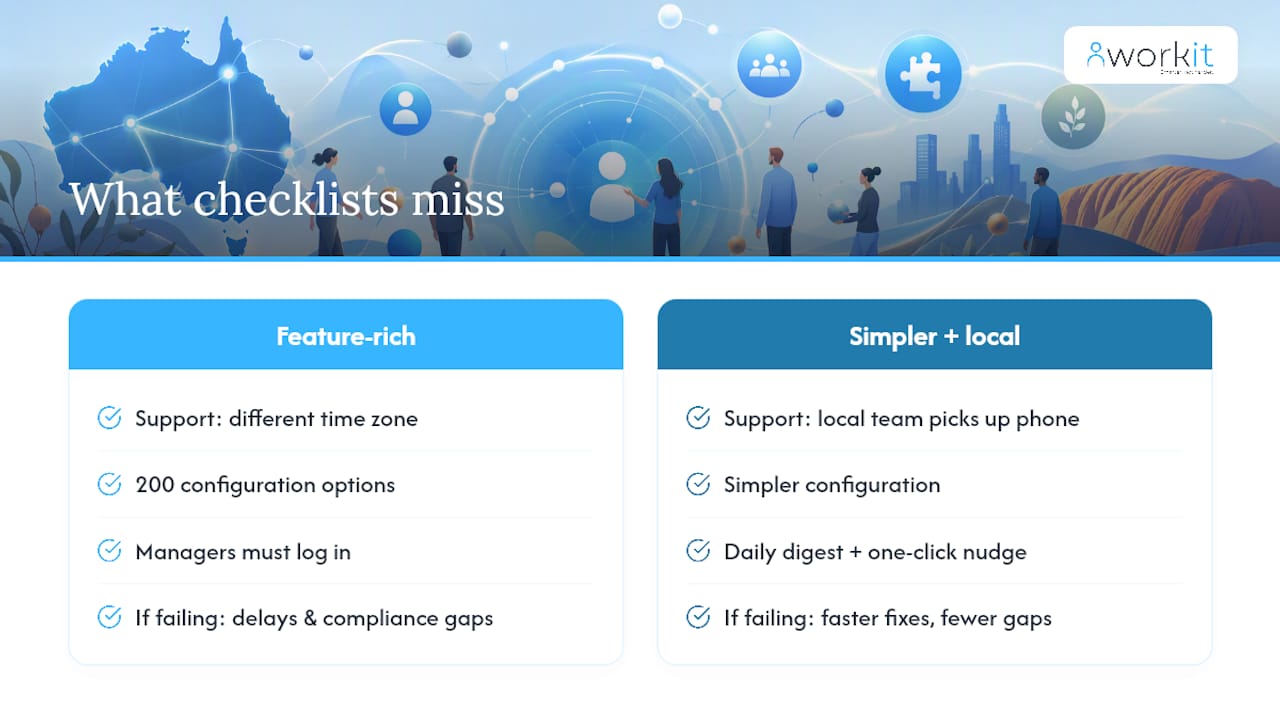
The portals that fail Australian HR teams most often are not the ones with the fewest features. They are the ones with the most features and the least local support. A platform with 200 configuration options and a support team in a different time zone will cost you more in implementation delays and compliance gaps than a simpler platform with a local team who picks up the phone.
The second thing most checklists miss is the manager experience. New hires complete their tasks when managers actively use the portal themselves. A portal that sends managers a daily digest of overdue tasks, and makes it easy for them to nudge a new hire with one click, produces better completion rates than one that requires managers to log in and navigate to a report.
Prioritise features by operational risk first: what happens if this feature fails or is missing? TFN capture, Fair Work distribution, and payroll integration carry the highest risk. Learning paths and analytics carry real value but are recoverable if they need to be configured post-launch. Build your RFP scoring accordingly.
Workit covers the full feature checklist for Australian employers
Workit is built specifically for Australian businesses, and its onboarding module maps directly to the feature checklist in this article. TFN and super capture, Fair Work Information Statement distribution with acknowledgement tracking, policy sign-offs, role-based learning paths, payroll and Xero integration, and real-time compliance reporting are all included in a single platform.
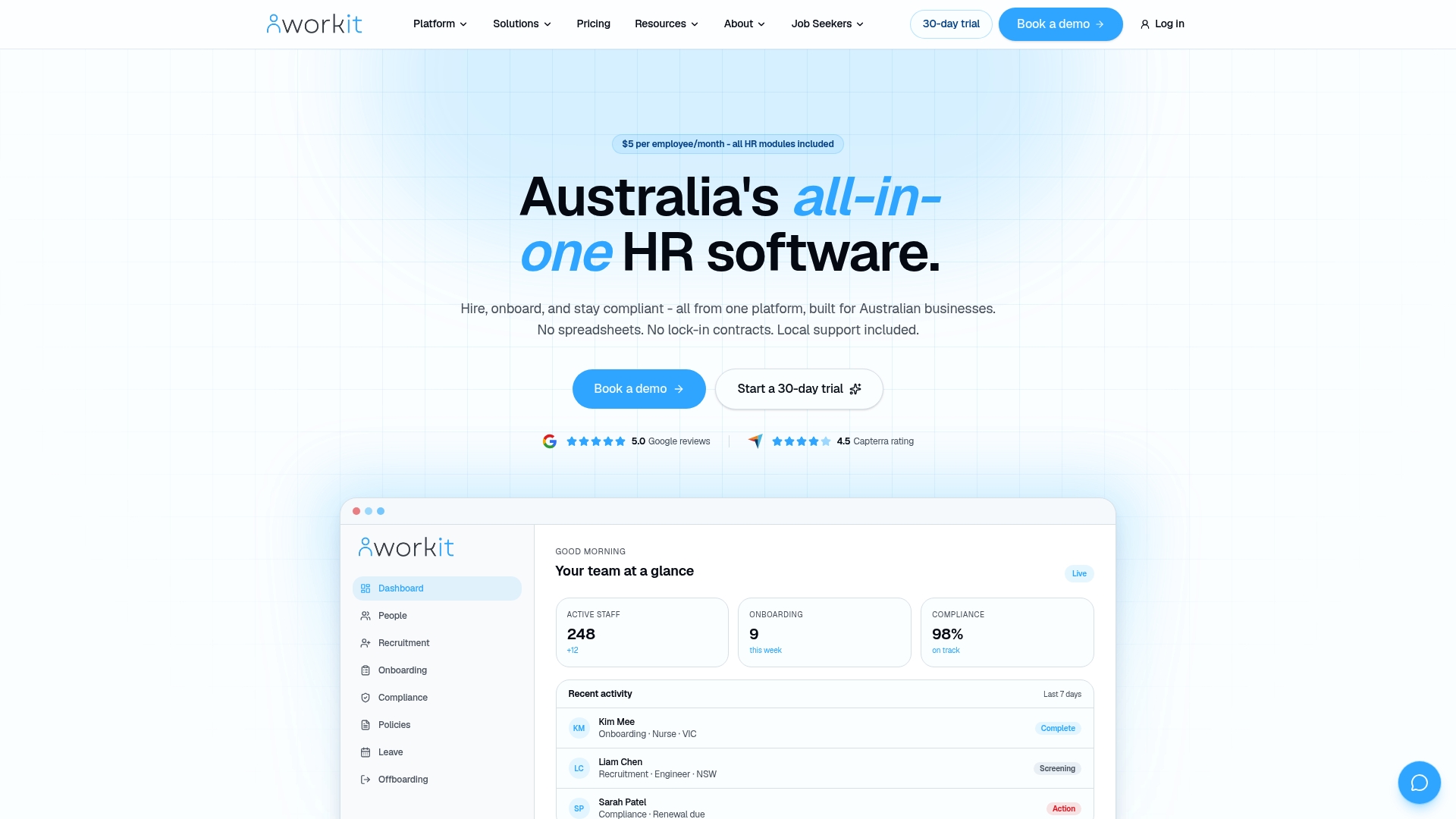
Pricing is transparent: $5 per employee per month covers every module, with no hidden fees and no per-feature add-ons. Optional implementation services are available for teams that want hands-on configuration support. Local support from a team that knows Australian employment law means you get practical answers, not generic ticket responses.
If you are ready to see how Workit maps to your specific requirements, book a demo or start a 30-day trial and bring your feature checklist with you.
Sources
- Employee Self-Service Portal Setup: An ITSM Guide (AU)
- Build a secure employee onboarding portal without coding
This article is general information, not a substitute for advice from a qualified lawyer. Consult a qualified legal professional about your own circumstances before acting on anything here.
FAQ
What is an onboarding portal?
An onboarding portal is a digital platform that manages the administrative, compliance, and training tasks required to bring a new employee into an organisation. It replaces paper forms, email chains, and spreadsheets with automated workflows, secure document storage, and real-time reporting.
What are the 5 C’s of employee onboarding?
Definitions vary across HR frameworks, but a widely used version covers Compliance (legal and policy requirements), Clarification (role expectations and goals), Culture (organisational values and norms), Connection (relationships with team and manager), and Check-back (structured follow-up at 30, 60, and 90 days).
What is the 30-60-90 onboarding rule?
The 30-60-90 rule structures a new hire’s first three months into phases focusing first on learning and orientation, then applying knowledge and building relationships, followed by contributing independently and setting longer-term goals. A portal automates the task sequences and check-ins for each phase.
What types of onboarding does a portal support?
Most onboarding portals support pre-boarding (before day one), day-one induction, role-specific onboarding, remote onboarding, and compliance-focused onboarding for regulated industries. Workit’s onboarding module handles all of these within a single platform, with workflow branching based on role, location, and employment type.
How does an onboarding portal help with Australian compliance?
A portal captures TFN declarations and super choice forms digitally, distributes the Fair Work Information Statement with a timestamped acknowledgement, and stores all documents with an immutable audit trail. This means you can produce evidence of compliance quickly during a Fair Work inspection or internal audit, without searching through email or paper files.