

Real-time HR reporting: what it is and why it matters now
Real-time HR reporting is a system that captures workforce events as they happen and reflects them in dashboards within minutes, not weeks. Instead of waiting for a monthly spreadsheet to tell you a team’s turnover spiked in March, you see it the day it happens, and you can act before it becomes a pattern.
That speed matters more than most HR teams give it credit for. Compliance risk builds up between reporting cycles, not during them, and Australia’s shift to pay-cycle superannuation has made pay-run visibility a genuine governance requirement rather than a nice-to-have. Workforce planning suffers the same way: by the time a quarterly report flags an attrition trend, you have already lost the people you needed to keep.
Here’s what anchors the case for moving now:
- Superannuation reporting cycles have tightened, and payroll errors that once surfaced quarterly can now surface at every pay run.
- Platforms like Workit build real-time reporting into the core HRIS rather than bolting it on as an add-on module.
- Industry data on people analytics shows most organisations still operate on periodic “what happened” reports rather than continuous, diagnostic ones.
If you’re weighing whether to move on this now, start with a two-week data audit of your current HRIS and payroll feeds before you commit to a full platform switch. That audit alone usually reveals whether your existing systems can support real-time reporting or whether you need new integrations first.
Key Takeaways
Real-time HR reporting works because it replaces monthly guesswork with continuous, event-driven visibility across payroll, compliance and workforce metrics.
| Point | Details |
|---|---|
| Audit before you buy | Map your current HRIS, payroll and attendance systems for data quality gaps before choosing a platform. |
| Start with one use case | Pilot payroll compliance flags or attrition detection in a single team before scaling company-wide. |
| Prioritise payroll and super flags | These metrics carry the clearest compliance risk and the fastest visible return once moved to real time. |
| Vet vendors on specifics | Demand a real latency number, a visible audit trail and clear data residency answers, not vague marketing claims. |
| Choose Workit for integrated reporting | Workit bundles real-time dashboards, payroll integration and compliance tracking into one $5 per employee per month platform with Australian support. |
Table of Contents
- What is real-time HR reporting, and how does it differ from periodic reporting?
- Which features and metrics matter most in real-time HR reporting?
- What business benefits come from moving to real-time HR reporting?
- How does real-time HR reporting actually work behind the scenes?
- What’s a realistic roadmap for implementing real-time HR reporting?
- How do you choose the right real-time HR reporting solution?
- What can go wrong when adopting real-time HR reporting, and how do you avoid it?
- Why is now the right moment for Australian businesses to adopt this?
- When should you move now versus pilot first?
- How Workit brings real-time HR reporting into one platform
- Sources
- FAQ
What is real-time HR reporting, and how does it differ from periodic reporting?
Periodic HR reporting answers “what happened last month.” Real-time HR reporting answers “what’s happening right now, and what does it mean.” The difference isn’t just speed. It’s the type of question each one can actually answer.
A monthly headcount report tells you that you lost four people in accounting last month. A real-time dashboard tells you that two of those four resignations came within 48 hours of each other, both from the same manager’s team, and that a third employee on that team has just logged an unusual spike in sick leave. One is a record. The other is an early warning system.
Most HR functions still run on the older model. Standard reports on headcount, turnover, time-to-fill and compensation describe the past; they don’t diagnose why something happened or forecast what’s coming next. Real-time and continuous people analytics extend that static snapshot into an ongoing signal you can query on demand.
How the data actually moves
The mechanics are simpler than the marketing usually makes them sound. Data flows from source systems (your HRIS, payroll, time and attendance, applicant tracking) into a central pipeline that cleans and models it, then pushes updates to dashboards and alerts. The key technical traits that separate genuine real-time systems from repackaged periodic ones:
- Low latency: updates appear in minutes or hours, not days.
- Event-driven refresh: a change (a new hire, a resignation, a payroll run) triggers an update automatically, rather than waiting for a scheduled batch job.
- Queryability: you can ask an ad hoc question (“show me overtime by department this week”) without waiting for IT to build a custom report.
- Audit trail: every change is logged, timestamped and traceable, which matters as much for a Fair Work inquiry as for internal governance.
| Reporting type | Update frequency | Best for answering |
|---|---|---|
| Periodic (monthly/quarterly) | Weeks to months | What happened last period? |
| Batch real-time (daily sync) | Hours to a day | What changed since yesterday? |
| True real-time (event-driven) | Minutes | What is happening right now? |
Picture a payroll run on a Thursday afternoon. A periodic system tells you three weeks later that twelve employees were underpaid super contributions. A real-time system flags the discrepancy the moment the pay run processes, while there’s still time to correct it before the next Fair Work reporting window closes.
Which features and metrics matter most in real-time HR reporting?
Not every “real-time” platform delivers the same depth. The features worth demanding, and the metrics worth tracking through them, separate genuinely useful systems from dashboards with a fresh coat of paint.
Core features to expect
- Live dashboards that update on a rolling basis rather than refreshing overnight.
- Event streaming so changes in one system (a resignation logged in the HRIS) trigger downstream updates automatically.
- Ad hoc querying that lets HR staff pull a custom view without submitting a ticket to IT.
- Scheduled alerts for threshold breaches, like absence rates crossing a set percentage.
- Predictive signals that flag likely attrition or compliance risk before it becomes a headline number.
- Role-based views so a line manager sees their team’s data and a CFO sees cost trends, without either drowning in irrelevant detail.
- An integration library covering payroll, time and attendance, and applicant tracking out of the box.
The metrics worth watching live
| Metric | Definition | Why real-time visibility helps |
|---|---|---|
| Active headcount | Current employed staff by team/location | Confirms staffing levels match rostering and budget in real time |
| Rolling turnover | Turnover calculated on a moving 30/90-day window | Surfaces sudden spikes before they show up in quarterly averages |
| Time-to-fill | Days from role opening to offer accepted | Flags stalled recruitment pipelines while there’s time to intervene |
| Absence rate | Unplanned leave as a percentage of rostered hours | Highlights burnout or engagement risk in specific teams early |
| Utilisation | Billable or productive hours against total hours | Useful for services businesses tracking margin in near real time |
| Engagement pulse | Frequent short surveys instead of annual ones | Captures sentiment shifts as they happen, not months later |
| Cost-per-FTE | Total employment cost divided by active headcount | Gives finance a live view instead of a monthly reconciliation surprise |
| Payroll/super flags | Automated checks against award rates and super obligations | Catches underpayment or super gaps at the pay run, not the audit |
Pro Tip: If you can only move one metric to real time first, make it payroll and superannuation flags. It’s the metric with the clearest financial and compliance downside if it stays batch, and the fastest to show ROI once it’s live.
SLA expectations vary by metric type. Payroll flags and attendance anomalies genuinely need event-driven, near-instant refresh. Engagement pulses and cost-per-FTE trends are useful daily or weekly. Don’t pay for millisecond refresh on a number that only needs checking once a day.
What business benefits come from moving to real-time HR reporting?
The technical capability only matters if it changes decisions. Here’s where it actually does.
- Faster decisions: a manager can act on a resourcing gap the day it appears instead of the month it’s reported.
- Proactive retention: attrition risk shows up as a pattern (declining engagement scores, rising sick leave, overtime spikes) before someone hands in their notice.
- Audit-ready compliance: continuous logging means you’re not scrambling to reconstruct records when a regulator or auditor asks a question.
- Dynamic workforce planning: headcount and cost data that updates weekly, not quarterly, means budget forecasts stay accurate through the year.
- Cost control: overtime, contractor spend and cost-per-FTE trends surface while there’s still budget left to manage them.
Three scenarios illustrate the shift in plain terms. A mid-sized logistics firm running batch payroll reporting discovered at its annual audit that a rostering error had underpaid superannuation for eleven staff over six months. With pay-run level flags, that gap would have surfaced at the first affected pay cycle, not the annual reconciliation. A professional services firm noticed, through a real-time engagement pulse, that one division’s sentiment score dropped sharply two weeks before three resignations were submitted; the earlier warning gave management time to intervene with one of the three. And a retail employer using live recruitment analytics cut its average time-to-fill by triaging applicants against a real-time pipeline dashboard instead of a weekly spreadsheet export, catching stalled requisitions faster.
The evidence backing this isn’t anecdotal. A synthesis of HR analytics research found organisations using advanced analytics reported up to 35% improvement in quality-of-hire and a 28% reduction in voluntary turnover across the studies it reviewed. Those aren’t universal guarantees, but they’re a meaningful signal that the capability translates into outcomes when it’s applied well.
Different benefits land with different owners. HR gets retention and engagement signals. Payroll and finance get cost and compliance flags. Operations gets rostering and utilisation data. The value of a single platform is that all three see the same numbers instead of reconciling three different spreadsheets after the fact.
How does real-time HR reporting actually work behind the scenes?
Real-time reporting is only as good as the data feeding it. Understanding the plumbing helps you ask better questions before you sign a contract.
Where the data comes from
Most organisations draw on eight core sources: the HRIS, payroll, time and attendance, applicant tracking, learning management, engagement survey tools, building access control, and rostering software. Each one contributes a different slice of the picture, and each needs its own integration path.
- API connections for systems with modern, documented interfaces (most contemporary payroll and HRIS platforms).
- Webhooks for event-triggered updates (a new hire, a status change) rather than scheduled polling.
- File drops for legacy systems that can only export a CSV on a schedule.
- Middleware to reconcile identity and formatting differences between systems that were never designed to talk to each other.
Refresh cadence isn’t one-size-fits-all
| Data source | Typical refresh method | Realistic SLA |
|---|---|---|
| Payroll runs | Event-driven, triggered at pay run | Minutes after processing |
| Time and attendance | Polled or webhook | Hourly to daily |
| Applicant tracking | API sync | Near real time to daily |
| Engagement pulse surveys | Scheduled batch | Daily to weekly |
| Learning management | File or API sync | Daily |
The most common implementation risk isn’t the technology. It’s identity matching: the same employee appearing under slightly different names or ID formats across payroll, the HRIS and time and attendance, which quietly corrupts every downstream report until someone catches it.
Pro Tip: Before go-live, run a manual reconciliation of employee IDs across every source system you’re integrating. A single mismatched identifier can silently double-count or drop an employee from every report that follows, and it’s far cheaper to catch in week one than month six.
Platforms that centralise HRIS, payroll and compliance data in one system, rather than stitching together separate tools, avoid a lot of this identity-matching pain by design, because there’s only one source of truth to begin with.
What’s a realistic roadmap for implementing real-time HR reporting?
Moving from periodic reports to real-time dashboards doesn’t happen in a weekend, but it doesn’t need to take a year either. A sensible rollout follows six stages.
- Audit your current data (week 1 to 2): map every system that holds workforce data and check how clean and consistent employee records actually are across them.
- Define your first use cases (week 2 to 3): pick one or two problems worth solving first, such as payroll compliance flags or attrition hotspot detection, rather than trying to build every dashboard at once.
- Choose a pilot team or department (week 3 to 4): a single division with clear metrics and an engaged manager makes a far better test bed than a company-wide rollout.
- Integrate the core data sources (week 4 to 8): connect payroll, HRIS and time and attendance first, since these three feed the highest-value metrics.
- Iterate on the dashboard (week 8 to 12): refine what managers actually look at, cut the metrics nobody uses, and add alerts where they’re genuinely wanted.
- Scale to the rest of the business (month 3 onwards): once the pilot has a measurable win, extend the same setup to remaining teams.
Cost drivers worth budgeting for upfront:
- Integration complexity, especially with legacy or heavily customised payroll systems.
- Data clean-up, particularly around duplicate or inconsistent employee records.
- Licensing and subscription fees for the reporting platform itself.
- Implementation services if you need hands-on setup support rather than a self-serve configuration.
- Training time for managers who’ve never worked with a live dashboard before.
Quick wins to prove value inside the first 30 to 90 days: a single compliance flag catching a real payroll error, a manager using an attrition alert to have a retention conversation before someone resigns, or finance pulling a cost-per-FTE report without waiting on HR to run it manually. A narrow, well-chosen pilot targeting one high-value use case proves the concept faster than trying to solve everything at once.
How do you choose the right real-time HR reporting solution?
Vendor pitches all sound the same until you ask the right questions. Here’s what actually separates a platform that delivers from one that just says the words “real-time” in its marketing.
What to check before you shortlist anyone
- Integration breadth: does it connect natively to your payroll provider, or will you need custom middleware?
- Data model transparency: can the vendor explain exactly how a number is calculated, or is it a black box?
- Security and data residency: is your workforce data stored and processed in a way that meets Australian privacy obligations?
- SLAs for refresh cadence: get the actual number in minutes or hours, not the word “instant.”
- Audit trails: can you pull a full history of who changed what, and when?
- Role-based access: can a line manager see their team without seeing the whole company’s salary data?
- Pricing clarity: is the cost per employee, per module, or a custom quote you won’t get until the third sales call?
Questions worth asking in the actual demo
- “Show me how long it takes for a payroll change to appear on this dashboard, live, right now.”
- “Walk me through a query I could build myself without submitting a support ticket.”
- “What happens to the dashboard if a data feed from one system goes down for a day?”
- “Can I export this data in a format my finance team can actually use?”
- “Who has access to this audit log, and how far back does it go?”
Red flags to watch for: vague latency claims that never resolve to a specific number, a data model the vendor can’t or won’t explain, no visible audit log, and no local support team who understands Australian award rates and super obligations. Trust signals worth weighing the other way include documented case studies, clear SLAs in writing, security certifications, and a local implementation team rather than an offshore call queue.
Pro Tip: Ask every vendor the same latency question in the same words. The ones who give you a specific number in minutes are telling you something real. The ones who answer with “instant” or “seamless” usually mean overnight batch with a live-looking interface on top.
For a fuller checklist on compliance-specific features, it’s worth reviewing what a genuine HR compliance platform should offer before you compare vendors side by side.
What can go wrong when adopting real-time HR reporting, and how do you avoid it?
Most failed rollouts don’t fail because the technology didn’t work. They fail because of data, governance or people problems that nobody planned for.
- Data quality: garbage in, garbage out applies doubly to real-time systems, because errors propagate to dashboards within minutes instead of getting caught during a monthly review.
- Identity resolution: the same employee recorded under different formats across systems corrupts headcount and turnover figures silently.
- Privacy and consent: continuous monitoring of engagement or attendance data raises legitimate questions about what employees have consented to and who can see it.
- Alert fatigue: too many low-value alerts train managers to ignore all of them, including the ones that matter.
- Stakeholder adoption: a dashboard nobody logs into delivers zero value, no matter how accurate the data behind it is.
Governance needs a clear owner before go-live, not after. Decide who owns data accuracy, who approves access requests, and what the change control process looks like when someone wants a new metric added. Common barriers to HR analytics adoption include data integration gaps and capability shortfalls inside the HR function itself, not just the technology.
A short internal policy statement helps set expectations early:
Training matters as much as the platform itself. A manager who’s spent a decade reading monthly PDF reports won’t intuitively know how to interpret a live dashboard or what threshold should trigger a conversation with their team. Budget real time for hands-on training sessions, not just a login email and a help article.
Pro Tip: Run a “dashboard literacy” session in the first month of any rollout, showing managers exactly which three numbers matter for their team and what action each one should trigger. A dashboard nobody’s been taught to read is just decoration.
Why is now the right moment for Australian businesses to adopt this?
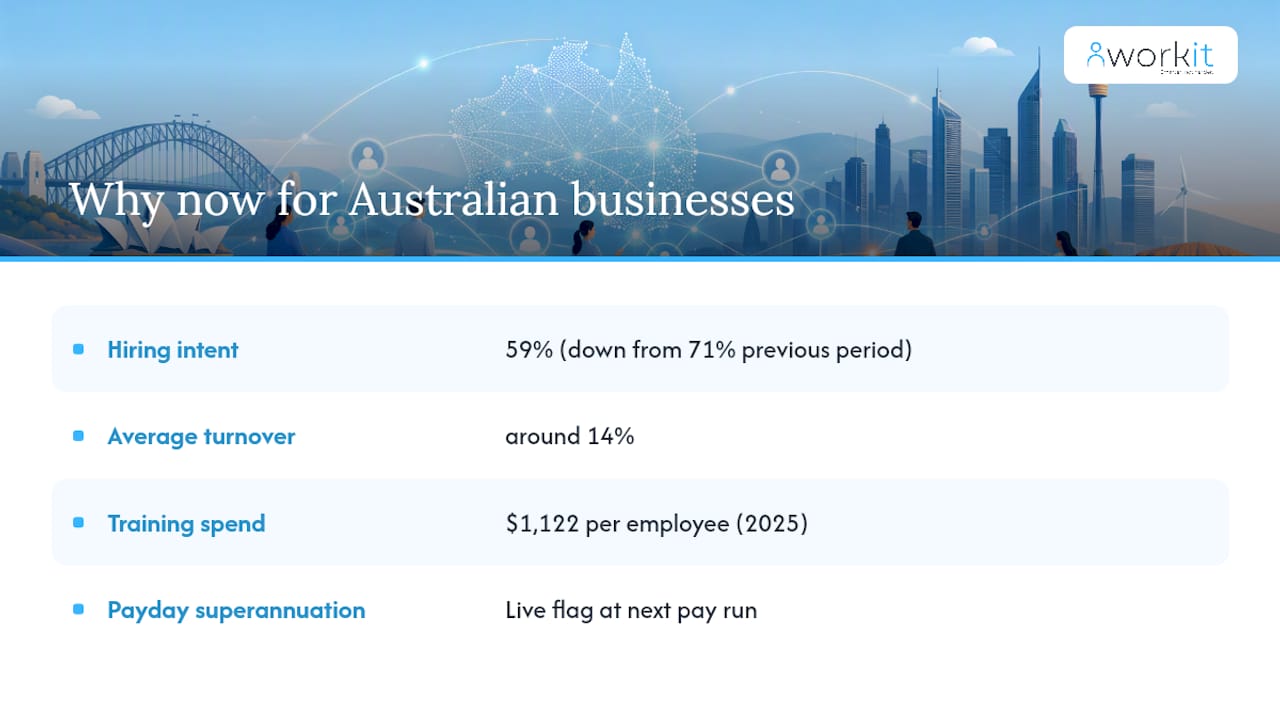
The market signals aren’t subtle. AHRI’s quarterly outlook shows 59% of organisations planned to hire in the March quarter, down from 71% the previous period, alongside average turnover sitting around 14% and Australian employers investing roughly $1,122 per employee on training in 2025. That combination, tighter hiring intent alongside steady turnover and rising training spend, is exactly the environment where real-time visibility pays off: you can’t afford to lose people you’re investing more to develop, and you can’t afford to over-hire into a softening market without live headcount data.
Mercer’s Australian executive summary echoes the same shift, noting that people analytics and workforce planning are climbing local priority lists, even as Australian leaders stay cautious about broader AI-driven redesign of HR functions. That caution is worth noting: the appetite is for better data and faster reporting, not necessarily for handing HR decisions over to an algorithm.
The regulatory trigger sharpening all of this is payday superannuation. One mid-sized services business discovered, only at its annual compliance review, that a payroll configuration error had underpaid super contributions for a cluster of casual staff across two quarters. Under the newer pay-cycle reporting expectations, that same error would show up as a live flag at the very next pay run, giving the payroll team days to fix it rather than months. That’s the practical argument for real-time reporting in one sentence: it turns compliance from an annual surprise into a weekly checklist item.
Further reading worth bookmarking: the talent analytics resources from SHRM cover practical metric templates, and industry analysis on professional services workforce trends offers useful context if your organisation sits in that sector.
When should you move now versus pilot first?
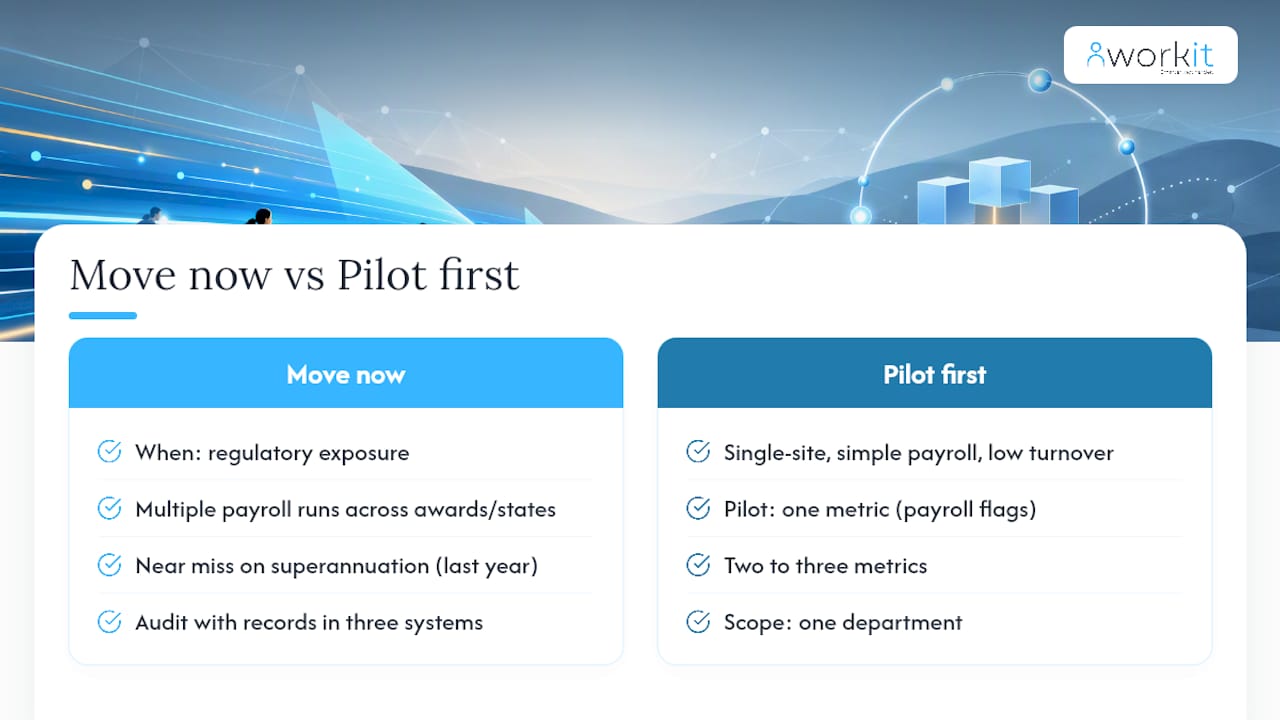
Not every business needs to flip the switch on full real-time reporting tomorrow, and pretending otherwise does readers a disservice. The honest answer depends on three things: regulatory exposure, payroll complexity and how dispersed your workforce already is.
If you’ve got multiple payroll runs across different awards or states, if you’ve had a near miss on superannuation compliance in the last year, or if you’re facing an audit with records scattered across three systems, the case to move now is strong. The cost of a compliance gap surfacing at audit time, rather than at the pay run where it happened, isn’t hypothetical. It’s the difference between a five-minute fix and a six-month remediation project.
For smaller, single-site businesses with a simple payroll structure and low turnover, a full real-time rollout on day one is probably overkill. Pilot first. Pick one metric, payroll flags are the obvious starting point given the compliance stakes, and run it for a full quarter before deciding whether to expand.
A sensible pilot scope looks like this: one department, two to three metrics, and a defined success measure such as “catch at least one payroll discrepancy before the next reporting deadline” or “reduce time-to-fill by 15% within the quarter.” If you hit that bar, you’ve earned the case to scale. If you don’t, you’ve lost a quarter, not a year and a budget line.
The governance conversation matters more than the technology selection, in my view. Too many rollouts get treated as an IT project when they’re really a stakeholder alignment exercise. Get payroll, finance and line managers agreeing on which numbers matter and who owns data accuracy before you sign any contract. The platform is the easy part. Getting people to trust and act on the numbers it produces is where most projects actually stall.
How Workit brings real-time HR reporting into one platform
Everything covered above, live dashboards, payroll flags, compliance audit trails, refresh cadence, comes standard inside Workit’s HRIS, not as a separate module you bolt on later. That matters because the identity-matching and integration headaches described earlier mostly disappear when payroll, onboarding, compliance and reporting all sit on the same underlying data, rather than being stitched together from three different vendors.
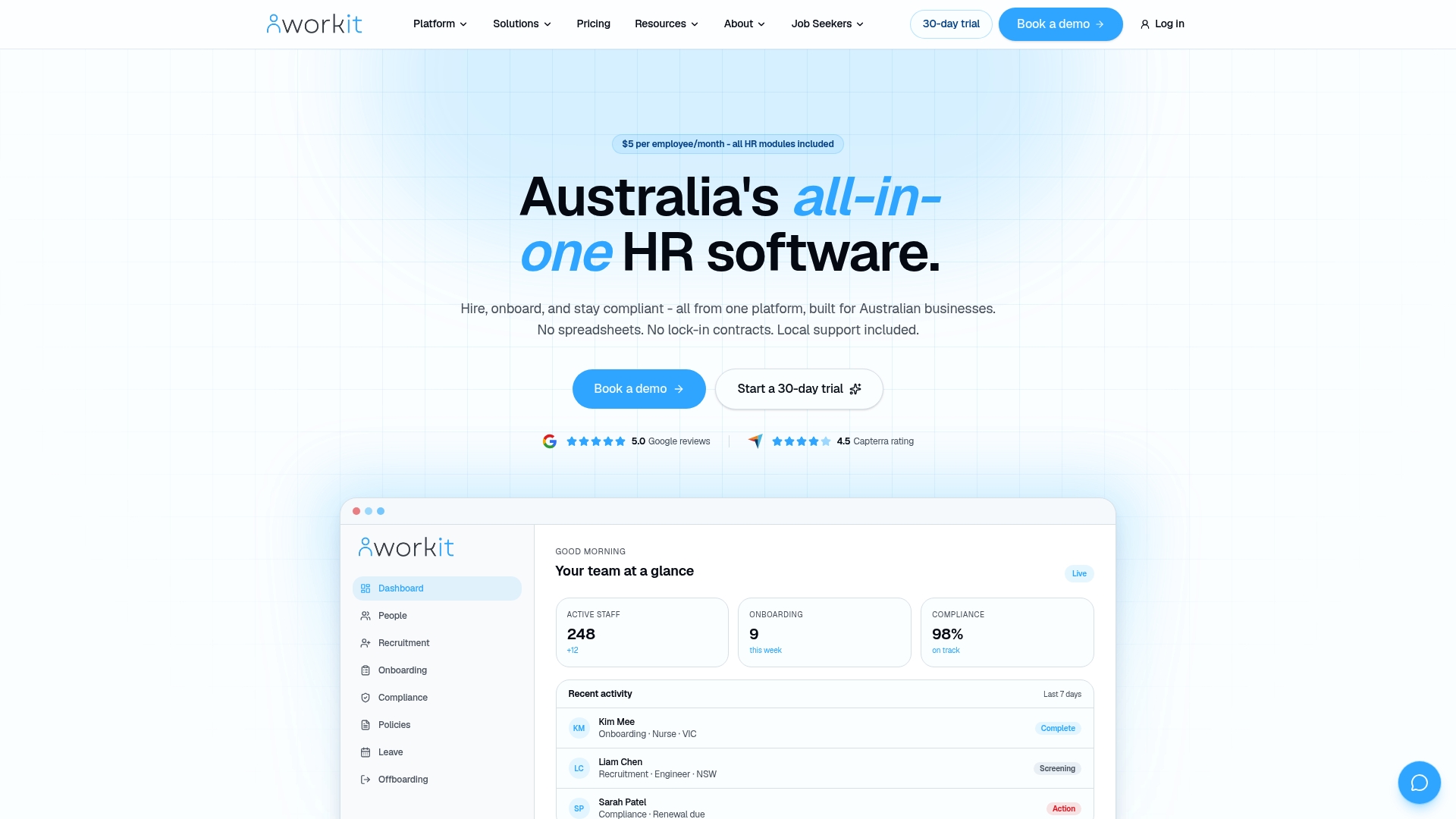
Workit’s reporting product gives HR managers and business owners live visibility into headcount, turnover, absence and payroll flags without waiting on IT to build a custom export. Compliance tracking runs continuously in the background, so a super contribution gap or award discrepancy surfaces at the pay run, not at the annual audit. And because Workit’s support team is based in Australia, questions about how a specific award or compliance rule applies to your business get answered by someone who actually knows the local landscape, not a generic offshore help desk.
Every module, recruitment, onboarding, compliance, performance, and real-time reporting, is included in the one transparent price of $5 per employee per month. No add-on fees for the reporting layer, no separate quote for compliance tracking. If you want to see how it looks with your own data, book a demo or start a trial and get pricing details walked through by a local team.
Sources
- Workforce analytics — HR data and compliance in Australia 2026
- People analytics: Better HR decisions in 2026 | Workisy
- Role of HR analytics in enhancing talent acquisition and employee retention
- Adoption of HR analytics to enhance employee retention in the workplace: A review
- Using talent analytics to predict and perform: HR (SHRM)
For readers wanting to go deeper on choosing a platform, Workit’s buyer guide to compliance software and its HRIS audit-readiness guide are useful next stops.
FAQ
What are real-time reports?
Real-time reports are dashboards or data views that update continuously as workforce events happen, rather than on a fixed weekly or monthly schedule. They’re built for diagnostic and predictive questions, not just historical record-keeping.
What are some examples of HR reports?
Common examples include headcount and turnover reports, time-to-fill and recruitment pipeline reports, absence and leave reports, payroll and superannuation compliance reports, and engagement pulse summaries. Platforms like Workit generate most of these live rather than as static monthly exports.
What are the 5 key HR metrics?
Definitions vary by organisation, but the metrics most HR teams track first are headcount, turnover, time-to-fill, absence rate, and cost-per-FTE. Many teams add engagement pulse and payroll compliance flags as a next layer once the core five are in place.
What is the most popular reporting tool?
There’s no single dominant tool across all businesses, since the right choice depends on integration needs, company size and budget. Australian businesses increasingly favour all-in-one platforms like Workit that combine HRIS, payroll integration and real-time reporting in one system rather than stitching together separate point solutions.
How is real-time HR reporting different from a standard HR dashboard?
A standard dashboard often just visualises last month’s static export, while real-time HR reporting updates as new data arrives, typically within minutes of a payroll run or system change. The distinction is refresh cadence and whether the underlying data pipeline is event-driven or scheduled.